
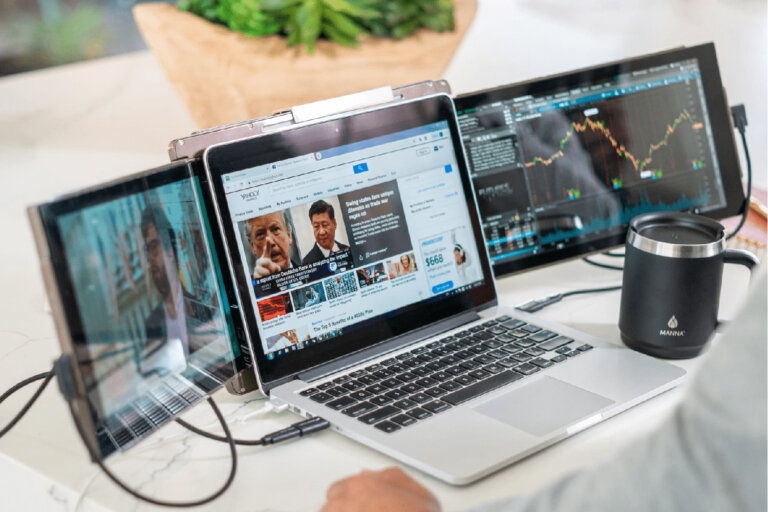

That three-screen workspace feels like it belongs at home and not in a carry-on. But the right setup can let you be as productive on the road as in front of a workstation. And here is how to pack and build a functional triple-display area without creating your luggage office on the go.
What Does a Three-Screen Carry-On Workspace Actually Mean?
A three-screen carry-on workspace just means your built-in laptop screen plus two extra displays from the Mobile Pixels Trio laptop screen extender. This saves you from constantly switching between windows, allowing your main work, research, and emails or messages to be visible at once. It means more time getting things done with less window shifting.
Choosing the Right Carry-On
Your carry-on is more important than you think. Search for fully fitted laptop sections, storage pockets, and substantial interior total depth that will be capable of containing your Trio along with the required power cables. A carry-on is generally 22 × 14 × 9 inches. But be sure to check with your airline about size, weight, and personal-item limits before packing.
The Carry-On Packing Breakdown
It helps to stay organized, protected, and handy with your electronics. You don’t need to pack a full-fledged office—just the essentials for your 3-screen laptop setup.
1. Laptop
Get a separate laptop sleeve and then put it up against the side of your carry-on that is best protected. Avoid exposure to hard accessories that may scratch or damage it. Find the actual length × width × thickness of your laptop before packing, and know precisely what amount of space it will occupy.
2. Mobile Pixels Trio
Store your Mobile Pixels Trio flat wherever possible, preferably in a protective sleeve or padded compartment. Also make sure to store it away from chargers and any other hard objects, securing the cables separately. Dimensions differ by Trio model, so be sure to measure each configuration before packing too.
3. Accessories
Have a compact cable pouch for your USB/connection cables, power adapter, charging cables, adapters, mouse (if needed), small keyboard (if needed), and headphones. Loose cables flying around your carry-on are such a pain. So, an organized pouch works well.
TSA and Airport Security Tips for a Three-Screen Workspace

It only takes a little preparation to make traveling with your laptop and Mobile Pixels Trio at airport security much easier. Depending on your checkpoint, you will have to separate out your electronics.
Keep Electronics Accessible
Store your laptop and Trio in easy-access pockets. It saves you time if security requests you pull them out and prevents your other bag contents from needing to be rearranged.
Be Ready to Remove Devices
Security protocols may differ anywhere you fly, between airports and checkpoints. So, watch for security guidance and have your electronics out as they ask you.
Pack Batteries Correctly
Power banks and additional lithium-ion batteries should be carried in hand luggage rather than checked baggage. Comply with TSA and airline regulations regarding battery type and size.
Keep Liquids Separate
If you are carrying any toiletries, follow the TSA container and liquid requirements. Keep them separate for easy removal if security wants to check.
Organize Cables and Adapters
Store Trio cables, chargers, and adapters all in one pouch. They usually do not require separation. But when they are arranged, inspection and repacking go quite easily.
Don’t Overstuff Electronics
Avoid cramming your electronics compartment. If a bag is too full, it can slow down the screening process, make removal of devices more difficult, and increase any repacking hassle required.
You can comfortably work away from home without the need for a huge desk setup. Link your laptop with this Mobile Pixels Trio laptop screen extender, and you will develop a triple-screen workspace in just the required size for it to become part of your traveling habit.
If you learn to pack smart, keep it simple, and make your workspace mobile.

0 Comments